Info Ponsel | Harga Ponsel | Game | Aplikasi | Tema | Tips Dan Trik =================================================================================================== New phone release SE W508 , Palm Pre , SE C510 , SH6010C , W233 , LG Viewty
Masih belum puas mencari informasi silahkan gunakan google search:

04 Januari 2009

Icephone

Icephone

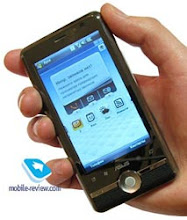
Pembuat ponsel di Inggris akan mulai memasarkan smartphone yang beda dari yang lain. Smartphone yang disebut Icephone ini, dibuat khusus untuk keperluan militer dan akan dipasarkan ke masyarakat umum.

Ponsel 3G ini mermiliki layar sentuh 3 inci. Ponsel memiliki tiga bagian, layar, keyboard QWERTY dan gamepad dengan berbagai fungsi. “Ponsel ini berubah bentuk sesuai yang dinginkan,” kata Graham Gilmour, dari The Medical Phone di Edinburgh.

Ponsel ini memiliki fungsi sebagai notebook mini, perangkat game dan navigasi satelit via GPS (global positioning system). Gilmour mendemostrasikan perangkat ini pada pameran 3GSM Asia di Macau.

Icephone mengambil nama dari “tombol ICE” yang ada di bawah keypad. Menekan tombol ini berarti memberikan tanda darurat, bahwa pemiliknya sedang dalam bahaya. Ponsel akan memberikan informasi lokasinya dari data GPS, menyediakan catatan medis pemilik ponsel, identitas pemilik serta data lain.

Nama ponsel ini ICE berarti “in-case of emergency” atau “jika dalam keadaaan darurat”. Informasi yang disediakan ponsel menyangkut data kontak yang tersimpan dalam handset.

Ponsel ini juga memiliki casing yang kuat, mampu tahan dijatuhkan dari ketinggian 1,2 meter. Ponsel juga tahan terhadap air hujan, salju atau dijatuhkan dalam air laut.

Icephone sudah mulai tahap pabrikasi dan akan dijual pada triwulan kedua tahun depan. Harganya masih bersaing dibandingkan smartphone lain di bawah US$ 1.000.

Smartphone ini menggunakan OS Microsoft Windows 6.0, keypad full QWERTY, built in GPS, Bluetooth dan Wi-Fi. Selain itu juga memiliki HSPA (high speed packet access) melalui jaringan 3G dan mendukung quadband GSM.

Sumber: studiohp.com

Ruang Link

RUANG LINK

Anda mungkin membutuhkan link untuk mencari situs-situs untuk memperkaya ponsel anda. Beberapa situs di bawah ini mungkin bisa jadi referensi untuk anda.

1. http://www.getjar.com/software

2. http://www.funmaza.com

3. http://gallery.mobile9.com

4. http://nokiasoftware.nl

5. http://www.phazeddl.com

6. http://funplusfun.com

7. http://www.mobiles24.com/

DUNIA PONSEL © 2008 All Rights Reserved

TIP’S CEGAH VIRUS PONSEL

TIP’S CEGAH VIRUS PONSEL

gambar

5 KIAT MEMBENTENGI PONSEL DARI HANTAMAN VIRUS

Ancaman virus yang melanda ponsel dan perangkat bergerak lainnya makin melonjak. Akibatnya pun kadang sangat merisaukan, misalnya hilangnya data atau pengiriman layanan pesan singkat (short message service/SMS) massal yang tak dikehendaki sehingga pulsa pun jebol.Ancaman virus yang melanda ponsel dan perangkat bergerak lainnya makin melonjak. Akibatnya pun kadang sangat merisaukan, misalnya hilangnya data atau pengiriman layanan pesan singkat (short message service/SMS) massal yang tak dikehendaki sehingga pulsa pun jebol.

Berikut beberapa tips untuk mencegah datangnya virus ke ponsel Anda, yang disampaikan oleh Australian Mobile Telecommunications Association (AMTA) dan dikutip detikINET dari Funponsel, Rabu (7/5/2008):

1. Pastikan Bluetooth dalam Kondisi Hidden Mode

Jika ponsel Anda dilengkapi Bluetooth, pastikan fitur ini berada dalam kondisi hidden mode atau invisible untuk mencegah perangkat Bluetooth orang lain mendeteksi perangkat Anda kecuali memang Anda menghendakinya. Selain itu, matikan Bluetooth jika tidak terpakai. Langkah ini akan cukup melindungi ponsel dari serangan virus yang menyebar melalui Bluetooth.

2. Hati-hati Saat Menerima Kiriman Asing

Ketika menerima aplikasi yang dikirim via Bluetooth atau membuka attachment MMS, berhati-hatilah dari kemungkinan adanya program jahat. Pastikan kiriman itu berasal dari sumber terpercaya. Bahkan jikalaupun kiriman itu berasal dari teman, lebih baik Anda tak membukanya dan menghapusnya jika terdapat konten yang tidak familiar.

3. Download dari Sumber Terpercaya

Pastikan juga selalu men-download konten dari sumber resmi yang terpercaya sehingga ancaman virus bisa tereliminir. Namun hati-hatilah karena bisa jadi kaum kriminal mampu mengkreasi sumber download yang kelihatan terpercaya meskipun sejatinya adalah gudang virus.

4. Pakai Anti Virus

Beberapa software khusus telah ditawarkan untuk menjaga ponsel Anda dari ancaman virus. Pakailah jika Anda merasa memerlukannya.

5. Hubungi Produsen Ponsel Anda

Jika Anda menduga ponsel Anda telah terinfeksi virus, segera kontak produsen ponsel Anda untuk mengambil langkah yang tepat dalam menghindari kerusakan.

KODE RAHASIA PART 2

TIP’S KODE RAHASIA PART 2

gambar

Siemens C 25

Secret Codes

SP unlock *#0003*(secret code 8 digits)#

*#06# for checking the IMEI (International Mobile Equipment Identity)

Resets language to automatic selection : * # 0000 # then Green button

Pin Out

1- GND
2- SB
3- POWER
4- NC
5- TX
6- RX
7- CLOCK
8- DATA
9- GND MIC
10- HF MIC
11- AUDIO
12- GND AUDIO

Sagem MC959
Secret Codes

MC959

in main menu press * for hot-menu:
lcd, led, vibra, tests, imei, software versions, battery voltage

Type MENU - 5 - 1 - 1 - # to enter Engineering menu on SAGEM (RC-712, 721, 815 and 815 plus) phones.

Panasonic G500

IMEI:
To view IMEI number *#06#

PINOUTS

1 - Ground
2 - TX_Audio
3 - Audio_Ground
4 - HF_ON (L=ON) -> L=H/F ON
5 - AOP_Sense <- Data Adaptor Select
6 - Serial_Up <- UART up (9600,33.8kbps)
7 - Serial_Down -> UART down
8 - External_Power <- POWER FOR CHARGING
9 - Ground
10 - RX_Audio
11 - Radio_Mute -> L=MUTE
12 - HF_Sense <- L=H/F MODE
13 - Reserved L=FLASH WRITE ENABLE
14 - Ignition <- H=ON
15 - Logic_Power -> H=HANDSET ON
16 - PAON -> Power Amplifier Control Signal.

Mitsubishi MT- D30

Secret Codes

Monitor mode: Hold C and press 379
Secret menu: Hold C and press 987
Version number: Hold C and press 597
Phase1 and 2 : Hold C and press 499
Warm start : Hold C and press 179
Instant turn off: Hold C and press 999
Unlock menu: Hold C and press 787090

Mitsubishi Trium

*#0000# to reset the phones menu-language to natural language, set initially by the distributor.

*#06# for checking the IMEI (International Mobile Equipment Identity)

hold * then 5806 - show software version
hold * then 5807 - a littel bit diffrent
hold * then 5472 - Testmode for datacable (it seems so)
hold * then 4329 - Activate and deactivate NETMONITOR
hold * then 621342 - Activate and deactivate another NETMONITOR
hold * then 3926 - shutdown

SP lock
You can turn around the lock routin by entering **04*PIN*PIN*PIN# now the secretcode change was applied and the software turns back to main menue. It works not on all triums, only on thos with older sofware versions.


SIEMENS S1 / S3 / S3 COM / S4

To view the software date and else with S3 com, S4, S4Power
press with SIM removed *#06# and left softkey.

To view some other stuff with S4Power
press with SiM removed *#06# and left softkey twice.

To view the software date with S3 com, S4, S4Power
press with SIM installed menu 98 and left softkey twice.

ACTIVATE MONITOR MODE

Siemens S1/S3

Menu, 9 (Phone Options), 7 (Phone Status), Left Display Button (left MENU key),
5553756, HangUp Button (Red HandSet key)

Siemens S3 COM/S4

Menu, 9 (Phone Options), 7 (Phone Status), Left Display Button
(left MENU key), 7684666, HangUp Button (Red HandSet key)

Note: Now Monitor should appear at the bottom of the Network Options menu.

MONITOR MODE

Pressing the right Display Button when in monitor mode will toggle into 1 and 2 modes

Pressing the right Display Button when in monitor mode will show a
list of the six cells with the strongest signals.

Test Mode Indicators: (* = only available when call in progress )

CH Channel Number

RX Signal Strength (dB)

N NCC (Colour Code)

B BCC (Colour Code)

CI Cell ID (in Hex)

C1+ How long before phone does forced hand over.(see RX and RXAM)

LAI Location Area Identity. Display Network ID code(42F010 = 240.01) and MSC

TXPWR Transmit Power (dB)

RXAM Receive signal strength cut-off point

TS* Time Slot Number

TA* Timing Advance. Distance from tower in Km X 2

PL* Power Level
SIEMENS S1

Here’s a trick to play Tetris, also known as Klotz on a Siemens S1.
Turn the phone on. Enter PIN. Before the telephone has logged in to the
your GSM net do the following steps.

1: Choose F 9 (function settings)
2: Choose send own number and push the right button for choose.
3: Push 9

USE 2 as <> , rotate the klotz with 5 and drop with 4.

Info Ponsel | Harga Ponsel | Game | Aplikasi | Tema | Tips Dan Trik
Free Web Hosting with Website Builder
CO.CC:Free Domain
CO.CC:Free Domain

Promo

About This Blog

"Life is not complete without communication, because humans live alongside each other and need each other"
© 2008 - 2009. Dunia Ponsel. All Rights Reserved.
Optimized for Mozilla 3.0/Internet Explorer 7.0/Opera 9.2. 1024x768 resolution.

  © Free Blogger Templates Blogger Theme II by Ourblogtemplates.com 2008

Back to TOP  

"
"